KlarVPN and Surfshark offer different reasons to consider them. KlarVPN brings connection controls and visibility together through an individual encrypted tunnel, a Transparency Dashboard, in-app logs, and a location speed test. Surfshark combines its VPN with routing options and subscription bundles that include additional security products.
If you want to inspect and manage your VPN connection, KlarVPN is worth trying. If you also need antivirus, breach monitoring, or data removal, Surfshark’s bundles may offer useful convenience.
The better choice depends on which features solve your problems and what you are comfortable paying.
This comparison focuses on connection control, privacy transparency, pricing, and security bundles.
KlarVPN vs Surfshark: The Differences That Matter
| What matters to you | KlarVPN | Surfshark |
| Managing your connection | Individual encrypted tunnel, Refresh Tunnel, Kill Switch, and Auto-Connect | Kill Switch, Rotating IP, split tunnelling, and other connection options where supported |
| Understanding the tunnel | Session-specific keys and a refresh function that rebuilds the tunnel | Multiple protocols, including Dausos, which advertises dedicated data tunnels |
| Inspecting privacy information | Transparency Dashboard and an in-app Logs view | Published policies, transparency reporting, and independent-assurance information |
| Evaluating the service | Ongoing Free plan with 3 GB monthly | Time-limited trial under applicable terms |
| Choosing a subscription | Plans primarily differentiated by data allowance | Plans differentiated by subscription term and bundled products |
Use these differences to identify what deserves a closer look. They do not establish a universal winner.
KlarVPN and Surfshark: What Can You Control After Connecting?
Both services offer controls intended to help manage your VPN connection, including a kill switch and automatic connection settings.
A kill switch helps prevent unprotected traffic after an unexpected VPN disconnection. Automatic connection settings can reduce the need to remember to activate the VPN, depending on configuration and support.
Their practical value depends on how they behave during your normal routine. Check what happens when you change networks, temporarily lose connectivity, or deliberately disconnect.
Beyond those shared functions, the providers offer different ways to manage a connection.
KlarVPN: Rebuild Your Tunnel With Fresh Keys
KlarVPN provisions an individual encrypted tunnel with session-specific encryption keys.
Refresh Tunnel replaces the current session with a newly provisioned tunnel, fresh encryption keys, a new VPN IP address, and a refreshed tunnel fingerprint. That gives you a direct way to rebuild the VPN connection rather than simply leaving the existing session running.
The fingerprint change relates to the tunnel. It does not mean your browser fingerprint, cookies, or signed-in accounts disappear.
An individual tunnel also does not automatically provide an exclusive public IP address. Underlying infrastructure or public exit IPs may still be shared.
Surfshark: Adjust IP Rotation and Traffic Routing
Surfshark offers Rotating IP and split tunnelling where supported. Rotating IP changes the VPN’s public address during a connection. Split tunnelling lets selected traffic bypass the VPN.
Its Dausos protocol also advertises dedicated data tunnels, so individual-tunnel terminology alone does not establish an exclusive advantage for either provider.
The useful distinction is the action you want to take. KlarVPN’s refresh function suits someone who wants to rebuild their tunnel. Surfshark’s routing controls may matter when someone deliberately wants different traffic to follow different paths.
Privacy You Can Inspect: KlarVPN’s Dashboard and Surfshark’s Evidence
KlarVPN makes session information part of the app experience.
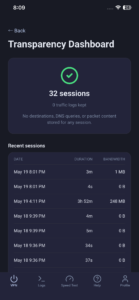
Its Transparency Dashboard shows session duration and bandwidth usage. It also displays privacy indicators stating that traffic logs, destinations, DNS queries, and packet contents are not stored for the session.
That can help answer everyday questions: How long has this session been running? How much data have I used? What does the service say it retains?
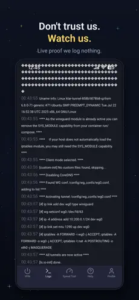
KlarVPN also includes an in-app Logs view. Technically experienced users can inspect the connection information exposed there and compare it with the app’s reported behaviour.
Surfshark provides privacy information through its published policies, transparency reports, and independent-assurance material. It announced a further Deloitte no-logs assurance engagement in 2025.
These forms of visibility serve different purposes. KlarVPN’s dashboard and logs support everyday inspection. An independent assessment examines particular systems and practices within a defined scope and period.
The information displayed by an app does not independently establish everything happening across its backend. Equally, an assessment is not a guarantee covering every future connection.
For someone who values information they can revisit while using the service, KlarVPN’s approach has practical appeal. For someone who places particular weight on external examination, Surfshark’s assurance history is relevant.
What Do Their Privacy Policies Say?
KlarVPN’s Privacy Policy states that it does not retain browsing history, DNS queries, or destination IP activity logs. It separately explains account information, payment tokens, usage totals, temporary connection metadata, and optional diagnostics.
Surfshark’s policy states that it does not store the websites you visit. It describes temporary connection information that it says is deleted within 15 minutes after a session ends.
Both policies distinguish browsing activity from information used to operate accounts and connections.
Refreshing a KlarVPN tunnel does not reset your monthly usage tally or delete account and payment records. Browsing activity that was never collected does not need to be erased.
Before You Connect: A Closer Look at KlarVPN’s Speed Test
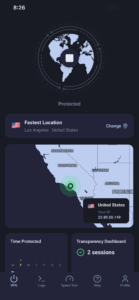
KlarVPN includes a location speed test that runs before the VPN connection is activated.
Select the server location you want to test, then review the download and upload results. The location list also provides connection-quality indicators.
This gives you a measurement to consider before choosing where to connect.
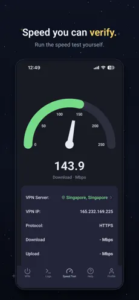
This is a look at KlarVPN’s location-selection tool, rather than a measured performance comparison with Surfshark.
A pre-connection result reflects conditions at the time of the test. It does not guarantee the throughput you will receive through the established tunnel.
For either provider, evaluate the connection using the activities that matter to you. Browsing, calls, downloads, and reconnection behaviour can reveal different aspects of performance. Keep the device, underlying network, and test conditions comparable.
There is no declared speed winner here because equivalent tests were not conducted.
KlarVPN vs Surfshark Pricing: Look Beyond the Monthly Figure
KlarVPN advertises three plans:
| Plan |
Advertised monthly price |
Monthly data |
| Free |
US$0 |
3 GB |
| Gold |
US$2.99 |
250 GB |
| Platinum |
US$7.99 |
Unlimited personal use, subject to safeguards against abuse |
Every KlarVPN plan includes all features, unlimited supported devices, and every available location. Free is also ad-free.
Surfshark offers Starter, One, and One+ with monthly and longer subscription terms. Its paid VPN subscriptions advertise unlimited bandwidth, while the bundles differ in their additional products.
KlarVPN’s plan choice primarily concerns how much data you need. With Surfshark, consider both the subscription term and the value of the bundled tools.
A discounted monthly equivalent may require a substantial upfront payment. Compare the amount charged now, the period it covers, and the next renewal amount.
Both providers have automatically renewing paid subscriptions unless cancelled. Surfshark’s introductory offers renew at the applicable standard rate.
Check KlarVPN’s current plans against the final offer available to you, including currency, taxes, and purchase-channel terms.
Trying KlarVPN or Surfshark Before Committing
KlarVPN’s Free plan provides 3 GB each month without a trial deadline. You can explore its features over time within that allowance.
Surfshark’s published website trial gives eligible new users seven days under its payment and subscription conditions. It converts to a paid subscription unless cancelled.
KlarVPN suits a gradual evaluation: your main limit is data. Surfshark’s trial provides a defined evaluation period, with a cancellation deadline to understand.
Use either opportunity to answer specific questions about the experience before paying.
Surfshark’s Security Suite or KlarVPN’s Connection Tools?
Surfshark’s bundles include products beyond its VPN:
| Plan |
General product scope |
| Starter |
VPN and Alternative ID |
|
One |
Adds Antivirus, Alert, and Search |
| One+ |
Adds Incogni data-removal services |
Check current inclusions, eligibility, and availability before purchase.
These products address different concerns. Antivirus checks for malicious software. Breach monitoring looks for supported information in known exposures. Data-removal services submit requests to supported brokers.
KlarVPN’s tunnel controls, dashboard, logs, and speed test help you establish, inspect, and manage the VPN connection.
If that connection experience is your priority, KlarVPN offers substantial features to evaluate. If you also need several of Surfshark’s additional products, a bundle may offer useful convenience.
Consider what you already use, too. A product you do not need adds little value to your subscription.
KlarVPN or Surfshark: Which Deserves Your First Try?
KlarVPN is a sensible starting point if you want an individual encrypted tunnel with controls and information you can inspect during everyday use. Refresh Tunnel, the pre-connection speed test, Transparency Dashboard, and Logs view give you several ways to evaluate the experience.
Its ongoing Free plan lets you try those features before deciding whether you need more data.
Surfshark deserves consideration if its routing controls, bundled security products, or independent-assurance history match your priorities.
Choose according to the features you will use, the evidence you consider important, and the payment commitment you are comfortable making.
To explore KlarVPN’s approach, visit KlarVPN’s connection and privacy features. Test a location, establish your tunnel, and use the information in the app to decide whether it fits your routine.
Leave a Reply